
When we use the internet—opening a website, sending an email, or downloading a file—we expect things to just work. Pages should load correctly, files should not be corrupted, and messages should arrive in the right order.
But the internet itself is not that reliable.
Data traveling over the network can get lost, duplicated, or arrive out of order. To solve these problems, we need clear rules. This is where TCP (Transmission Control Protocol) comes in.
In this blog, we’ll understand what TCP is, why it is needed, and how it works, with a special focus on the TCP 3-Way Handshake and reliable communication.
1. What Happens If Data Is Sent Without Rules?
Imagine two people trying to talk on walkie-talkies without any rules:
Both talk at the same time
Messages get cut in between
Some messages never reach
Order of conversation gets messed up
This is exactly what happens on a network if data is sent without protocols.
Since internet is a shared space. Millions of devices send data at the same time. Without rules, communication would be messy
So need a system that:
Makes sure data reaches the right destination
Ensures nothing is lost
Keeps everything in the correct order
That system is TCP.
2. What Is TCP and Why Is It Needed?
TCP (Transmission Control Protocol) is a communication protocol that ensures reliable data transfer between two devices over a network.
TCP is used when accuracy matters, such as:
Loading web pages (HTTP/HTTPS)
Sending emails
File downloads
Online payments
Why TCP is important:
It checks whether data is delivered successfully
It fixes errors automatically
It maintains correct order of data
It prevents data loss
In simple words: TCP makes sure data reaches safely, completely, and correctly.
3. Problems TCP Is Designed to Solve
TCP solves many real-world network problems:
1. Data Loss
Packets can disappear during transmission. TCP detects this and resends them.
2. Out-of-Order Delivery
Packets may arrive in the wrong order. TCP rearranges them correctly.
3. Duplicate Data
Sometimes the same packet is received twice. TCP removes duplicates.
4. Network Congestion
TCP controls how fast data is sent so the receiver is not overwhelmed.
5. Data Corruption
TCP checks data for errors and fixes issues using retransmission.
4. What Is the TCP 3-Way Handshake?
Before sending actual data, TCP first establishes a connection between the client and the server. This process is called the 3-Way Handshake.
Think of it like starting a phone call:
Client: "Hello, can we talk?" or Client: "Hello, Maalik"
Server: "Yes, I’m ready. Can you hear me?" or Server: "Haan bolo, meri awaaz aa rahi hai?"
Client: "Yes, let’s start." or Client: "Haan maalik, ek galti ho gayi."
Only after this confirmation does real communication begin.
5. Step-by-Step TCP 3-Way Handshake
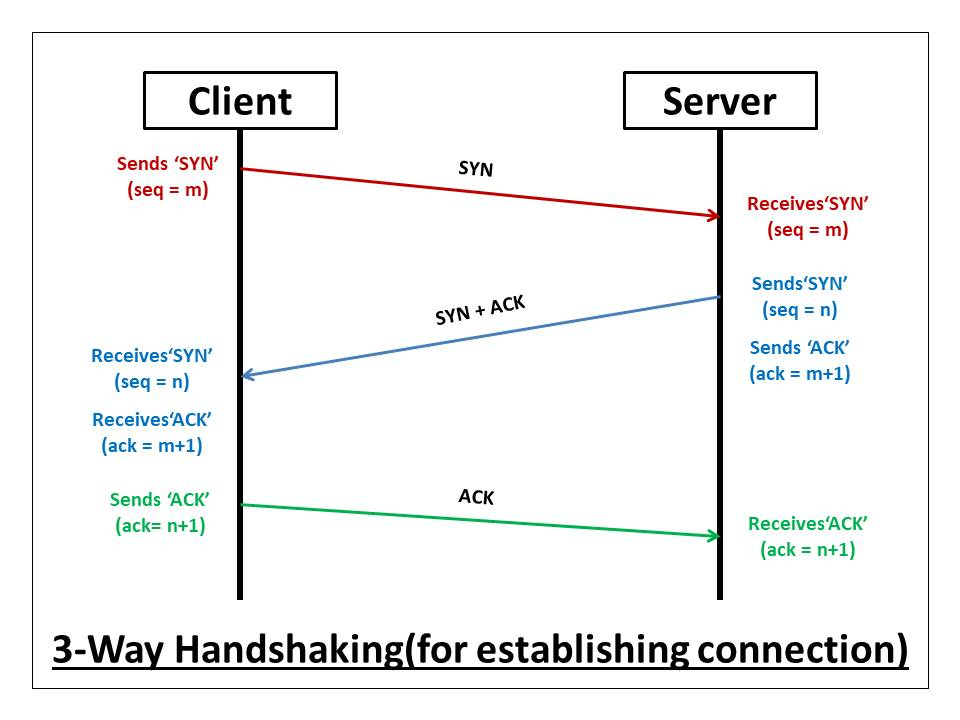
Step 1: SYN (Synchronize)
The client sends a message with a SYN flag.
This means:
“I want to start a connection.”
This message also contains a sequence number, which helps track data later.
Step 2: SYN-ACK (Synchronize + Acknowledge)
The server responds with SYN + ACK.
This means:
“I received your request, and I’m ready too.”
The server also sends its own sequence number.
Step 3: ACK (Acknowledge)
The client sends an ACK message.
This means:
“I received your response.”
Now the connection is established.
6. How Data Transfer Works in TCP
Once the connection is established, actual data transfer begins.
1. Data Is Broken Into Segments
Large data is divided into smaller pieces called segments.
2. Sequence Numbers
Each segment gets a sequence number so TCP knows:
Which segment comes first
Which comes next
3. Acknowledgements (ACKs)
After receiving data, the receiver sends an ACK:
- “I received data up to this number.”
4. Continuous Communication
Sender keeps sending data
Receiver keeps acknowledging
This back-and-forth ensures safe delivery.
7. How TCP Ensures Reliability, Order, and Correctness
> Reliability
If a packet is lost, TCP resends it
No data is silently dropped
> Order
Sequence numbers ensure data is arranged correctly
Even if packets arrive out of order, TCP fixes it
> Correctness
TCP checks for corrupted data
Incorrect packets are discarded and retransmitted
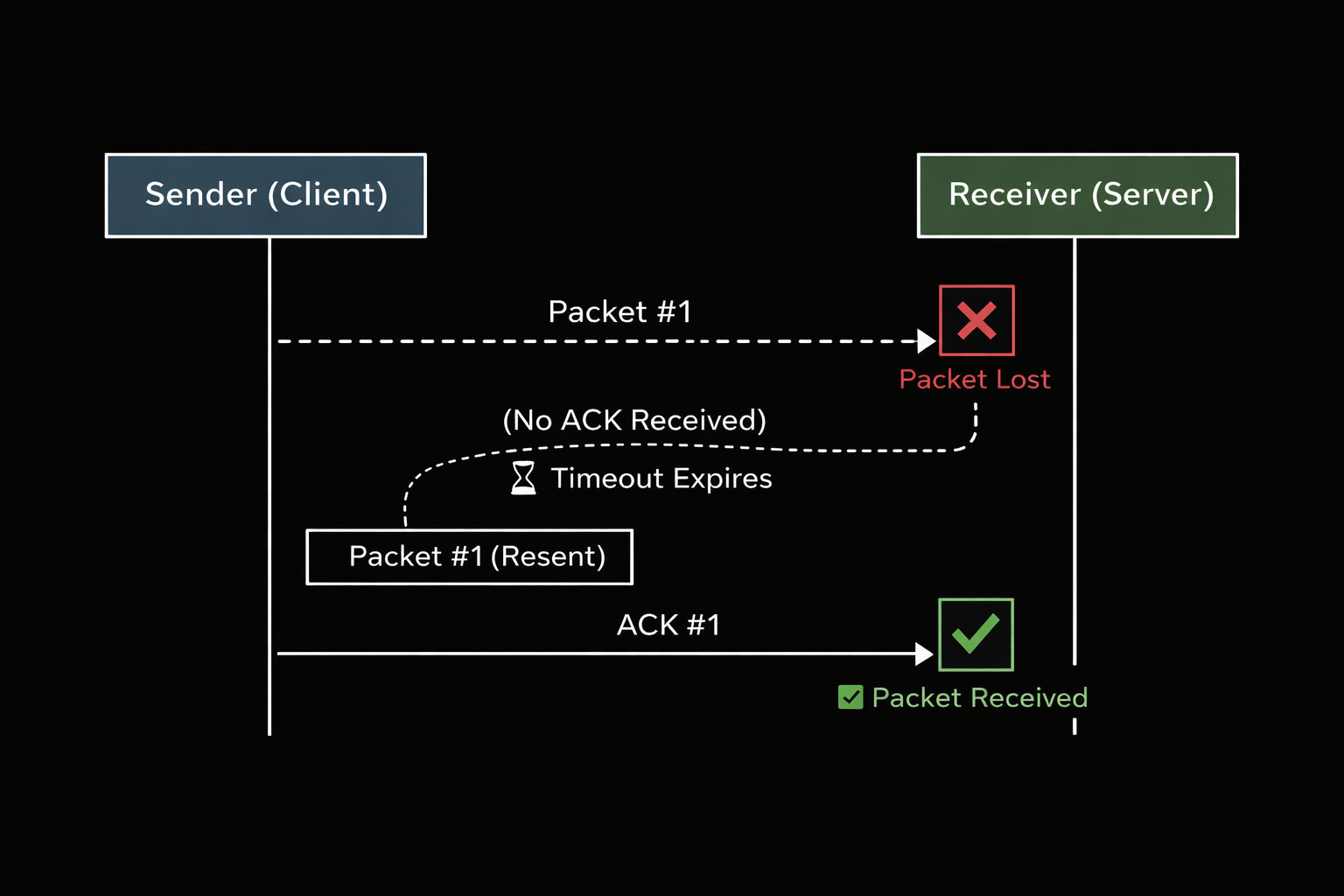
8. How TCP Handles Packet Loss
If a packet is lost:
Receiver does not send ACK
Sender waits for a timeout
Sender retransmits missing data
This automatic recovery is what makes TCP so reliable.
Diagram :
9. How a TCP Connection Is Closed
Just like starting a connection, closing it also follows rules.
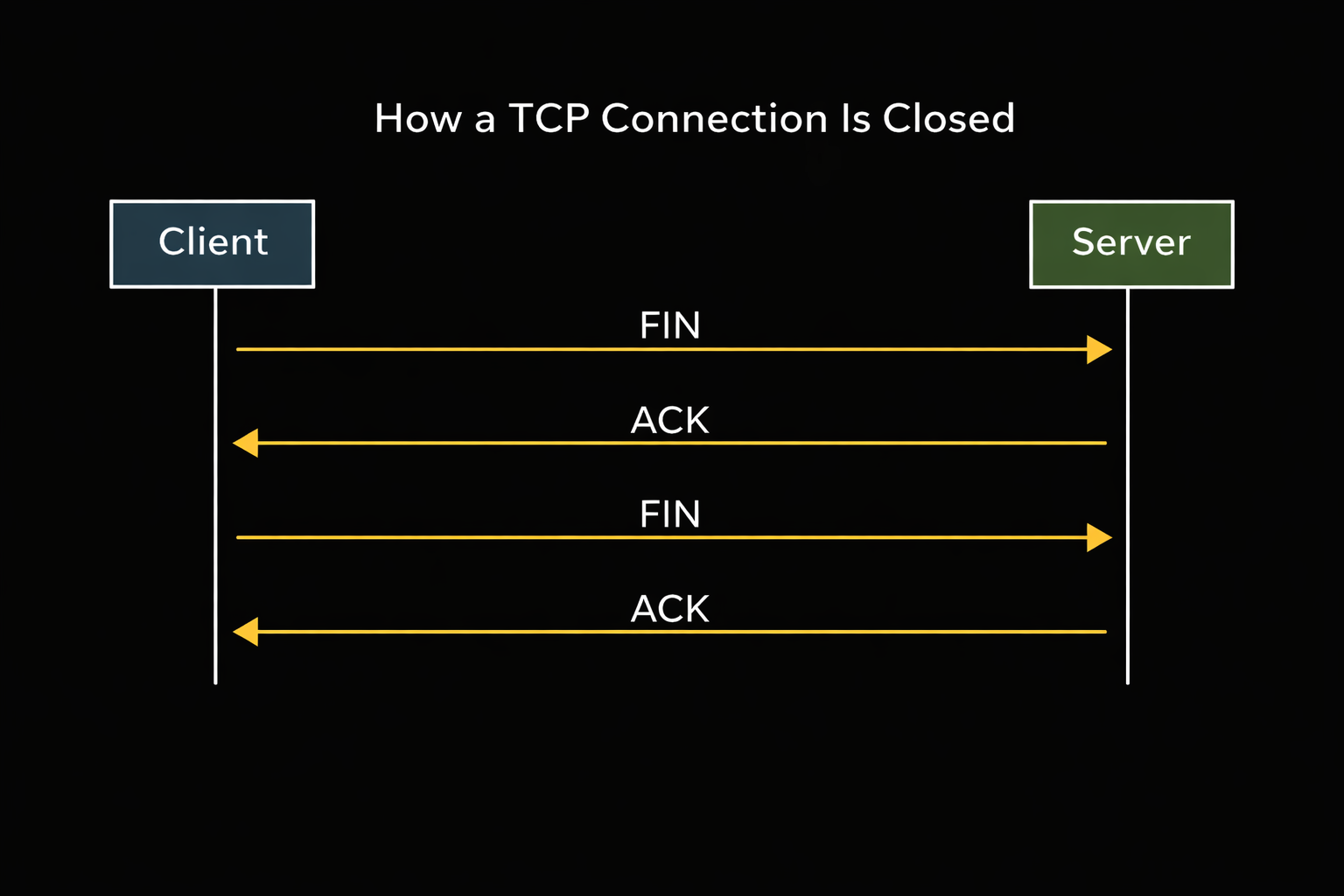
TCP Connection Termination (FIN & ACK)
FIN – Client says: “I’m done sending data”
ACK – Server confirms
FIN – Server says: “I’m done too”
ACK – Client confirms
After this, the connection is fully closed.
Diagram :
Final Summary
TCP is a reliable communication protocol
It solves data loss, order issues, and corruption
The 3-Way Handshake ensures a safe connection
Sequence numbers and ACKs ensure correct delivery
Lost packets are automatically retransmitted
FIN and ACK gracefully close the connection
Without TCP, the internet would be unreliable and Messy.
Thanks to TCP, we can browse, stream, download, and communicate safely.


