Understanding Variables and Data Types in JavaScript
(Toy Box Analogy)

Before building any cool website, application, or game using JavaScript, you need to understand variables and data types.
These are the basic building blocks of programming, because they allow us to store and manage information in our code.
In this article,we will understand the concepts using a simple and fun analogy — a Toy Box.
A. The Toy Box Analogy
Imagine you have a big toy box at home.
Inside the toy box you store different toys like:
Toy cars
Robot toys
Building blocks
Yo-yos
Now imagine every toy box has a label.
| Label | Toy Inside |
|---|---|
| car | toy car |
| robot | robot toy |
| blocks | building blocks |
In programming:
Label on the box → Variable name
Toy inside the box → Value (data)
So a variable is simply a labeled container used to store data.
Example:
let toyName = "Robot";
let toyCount = 3;
Here:
toyNameis the label"Robot"is the value stored in the box
B. Why Do We Need Variables?
Variables help us store and reuse information easily.
Without variables we would repeat the same information many times.
Example without variables :
console.log("Robot toy is ready to play");
console.log("Robot toy is charging");
Using variables:
let toy = "Robot";

console.log(toy + " toy is ready to play");
console.log(toy + " toy is charging");
Now if the toy changes, we only update one place.
C. Declaring Variables in JavaScript
In JavaScript, variables can be created using three keywords: var let const
Example:
var toy = "Car";
let toyCount = 5;
const toyBox = "Kids Room";
Explanation:
var → older way of declaring variables,
let → modern variable that can change
const → value cannot be reassigned
D. Primitive Data Types in JavaScript
A data type tells JavaScript what kind of data is stored in a variable.
There are five basic primitive data types beginners should know.
1. String (Text) :
let toyName = "Robot";//Stores numbers.
console.log(typeof toyName);  //"Robot" is a string.
2. Number
let toyCount = 10;//Stores numbers.
console.log(typeof toyCount);//10 is a number
3. Boolean
let isBroken = false; //Represents true or false values.
console.log(typeof isBroken0); //
4. Null
let toyOwner = null;
//Represents an intentional empty value.
//This means the variable exists but currently has no value.
5. Undefined
Means a variable exists but has not been assigned a value yet.
let toyColor;
The variable is declared but nothing is stored yet.
E. Difference Between var, let, and const :
| Feature | var | let | const |
|---|---|---|---|
| Can change value | Yes | Yes | No |
| Can redeclare variable | Yes | No | No |
| Scope | Function scope | Block scope | Block scope |
| Recommended today | No | Yes | Yes |
Example:
let toyCount = 5;
toyCount = 6; //This works.
But:
const toyBox = "Kids Room";
toyBox = "Living Room";
This will cause an error because const values cannot be reassigned.
F. What is Scope?
Scope defines where a variable can be accessed in a program.
Using our toy box analogy:
Global Scope
If the toy box is placed in the living room, everyone in the house can use it.
Example:
let toy = "Robot";

function play() {
  console.log(toy);
}//The function can access the variable.
Block Scope
If the toy box is inside your room, only people inside that room can access it.
Example:
if (true) {
  let score = 100;
}
//score exists only inside the block.
G. Understanding Hoisting (Memory Zone vs Execution Zone)
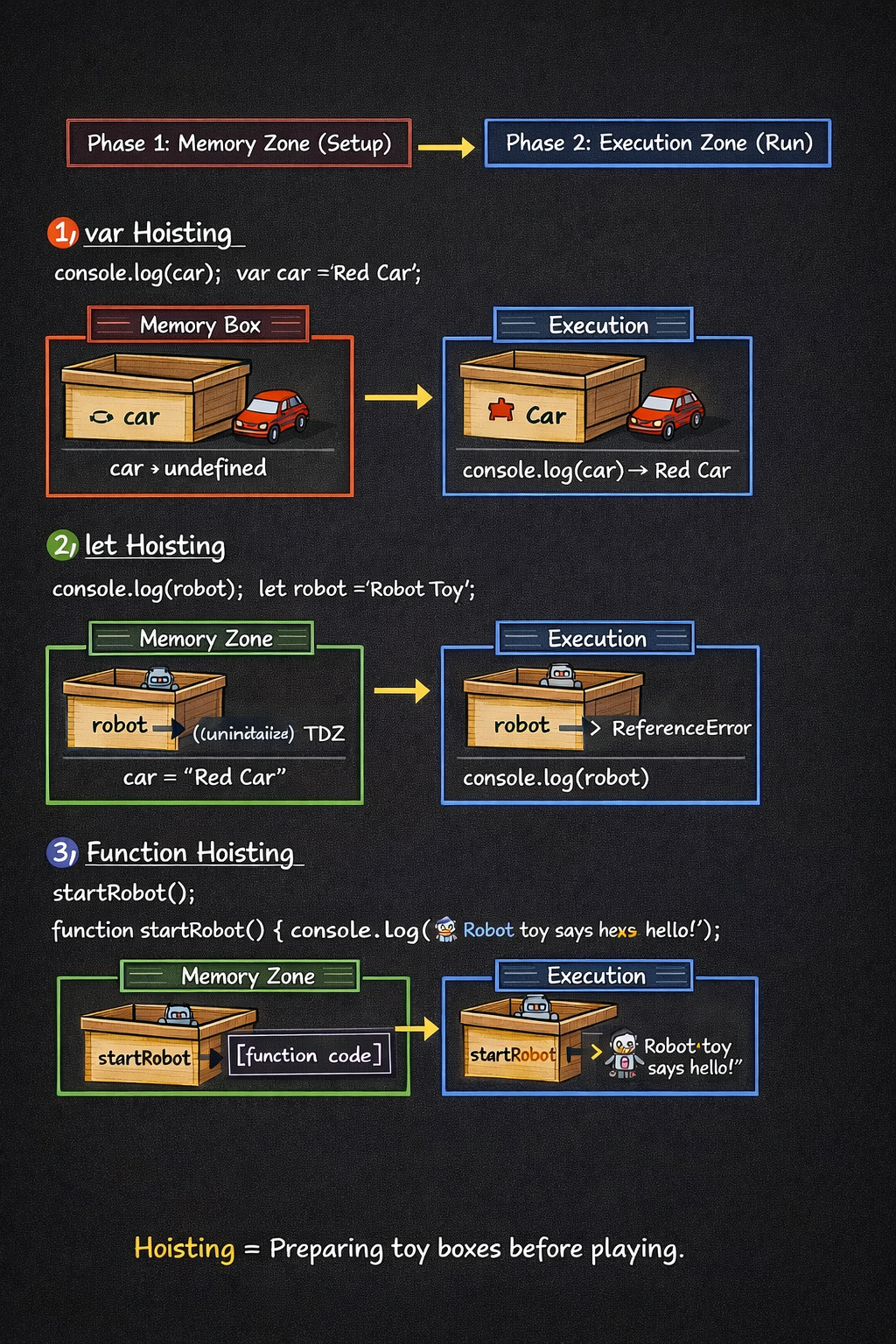
In JavaScript, code runs in two phases.
Memory Creation Phase (Memory Zone)
JavaScript scans the code and allocates memory for variables and functions.
Execution Phase (Execution Zone)
The code runs line by line and values are assigned.
Example with var
console.log(toy);

var toy = "Car";
Memory Zone
toy → undefined
Execution Zone
console.log(toy)→ prints undefinedtoy = "Car"→ value assigned
Output:
undefined
Example with let
console.log(robot);

let robot = "Robot Toy";
Output:
ReferenceError
Because let variables stay in the Temporal Dead Zone (TDZ) until their declaration line.
F. Hoisting with Functions
Hoisting also works for functions.
But different types of functions behave differently.
Function Declaration (Fully Hoisted)
startRobot();

function startRobot() {
  console.log("🤖 Robot toy says Hello!");
}
Memory Zone
startRobot → function stored
Execution Zone
Function runs successfully.
Output:
🤖 Robot toy says Hello!
Function Expression with var
driveCar();

var driveCar = function () {
  console.log("🚗 Car toy is driving!");
};
Memory Zone
driveCar → undefined
Execution Zone
TypeError: driveCar is not a function
Because the function is assigned after the call.
Function Expression with const
flyDrone();

const flyDrone = function () {
  console.log(" Drone toy is flying!");
};
Output:
ReferenceError
Because the variable is inside the Temporal Dead Zone (TDZ)
TDZ = the time when a variable is created but still locked and unusable.
Learnt-So-far
Understanding variables, data types, scope, and hoisting is essential when learning JavaScript.
In simple terms:
Variables store information
Data types describe the type of stored data
letandconstare the modern ways to declare variablesScope controls where variables can be accessed
Hoisting explains how JavaScript prepares memory before executing code


